¶ Alys – Frostune AI Assistant
Alys is Frostune’s AI assistant for Frostune:VO (FTVO).
It runs on a local language model hosted on Frostune’s private infrastructure, augmented with FTVO project data and specialized production tools. This allows Alys to understand the structure of your dialogue project, your recording workflow, and your audio pipeline.
Alys can assist designers, producers, QA, and audio teams by analyzing dialogue projects, identifying issues, and performing safe automation tasks.
Alys operates inside a secured Frostune environment and does not require sending project data to external AI services.
¶ Availability
Alys is currently available only for:
- teams with an active paid FTVO license
- approved pilot partnership projects
- projects covered by a signed NDA
- teams able to connect through Frostune’s private VPN access workflow
Because Alys connects to private Frostune infrastructure and may interact with sensitive project data, access is not enabled automatically.
To activate Alys for a project, Frostune must first:
- approve the project or pilot partnership
- complete the required NDA process
- configure secure access for the team
- provide the required VPN connection information
- enable the appropriate Alys / Agent API permissions
Alys access is granted per project or per approved team environment, please contact us at support@frostune.com
¶ Core Capabilities
Alys is designed to help teams understand, manage, and validate dialogue projects.
¶ Project Understanding
Alys can analyze the full FTVO project structure, including:
- number of scenes
- dialogue line counts
- speaker distribution
- recording status
- missing voice lines
- WAV coverage
- custom project properties
Example:
“How many lines are still missing recordings?”
¶ Dialogue Search and Analysis
Alys can query dialogue content using multiple filters.
Example questions:
- “Show all lines for the character PRINCE.”
- “Which scenes still contain TEXT_NEEDED placeholders?”
- “List lines that still require recording.”
- “Which scenes have the most dialogue lines?”
¶ Recording Workflow Support
Alys understands the recording pipeline used by FTVO.
It can help teams:
- analyze recording sheets
- detect missing or inconsistent lines
- identify mismatches between documents and the project
- estimate recording session time
- prepare character-specific recording lists
Example:
“Estimate how long this recording session will take.”
¶ Dialogue Editing
When authorized with the Editor agent, Alys can modify projects.
Supported editing tasks may include:
- creating scenes
- adding dialogue lines
- updating line text
- updating speaker assignments
- organizing folders
These operations respect FTVO safeguards such as:
- scene locking
- Perforce integration
- project write protections
- safe local project updates
Editor access should only be granted to trusted users.
¶ Example Alys Workflows
¶ Dialogue QA
A producer can ask:
“Show lines that still need writing.”
Alys will search the project and list lines containing TEXT_NEEDED.
¶ Recording Preparation
Alys can help prepare recording sessions:
“List all lines for character ALICE that are still to record.”
Alys can use FTVO line statuses, speaker data, and recording workflow rules to produce a focused list for the team.
¶ Document Comparison
Alys can compare external documents with the current FTVO project.
Supported examples include:
- recording sheets
- dialogue worksheets
- XLSX spreadsheets
- production review documents
Workflow:
- Drag the document into the Alys chat.
- Ask Alys to compare it with the project.
Example:
“Compare this recording sheet with the project.”
Alys can detect:
- missing lines
- mismatched speakers
- inconsistent status flags
- missing WAVs
- lines that need review
¶ Available Agents
Alys uses multiple specialized agents.
¶ FTVO Project Agent
Provides direct access to the dialogue project.
Capabilities include:
- project statistics
- scene browsing
- dialogue queries
- line editing when Editor mode is enabled
¶ Recording Workflow Knowledge
Alys includes built-in knowledge about:
- voice recording throughput
- recording session estimation
- common VO production workflows
- dialogue review and pickup workflows
This helps estimate recording time, scope, and budget.
¶ Jira Agent
If configured, Alys can interact with Jira.
Possible uses include:
- querying tickets
- summarizing issues
- assisting with production tracking
Example:
“Show open highest priority VO bugs.”
¶ Perforce (P4) Agent
If configured, Alys can read information from Perforce repositories.
Typical uses include:
- verifying project files
- comparing depot and local data
- assisting production teams with data checks
- identifying file or sync issues
¶ Documentation Agent
Alys can search the project documentation.
Example:
“How does the Unreal plugin work?”
¶ Unreal Integration
The Unreal plugin can allow Alys to access Unreal project data.
Possible capabilities include:
- querying dialogue assets
- checking imported voice lines
- validating audio integration
- comparing FTVO data against Unreal content
¶ Security Model
Alys is designed for secure studio environments.
Key principles:
- hosted on Frostune-controlled private infrastructure
- accessible only through approved WireGuard VPN access
- protected by project-specific access controls
- no external AI APIs required for the core assistant workflow
- project data is not shared across clients or projects
- all access requires an NDA and approved project setup
Each deployment uses controlled agents and permissions so that project data remains isolated.
¶ VPN Access Requirement
Alys access requires private network access to Frostune infrastructure.
For approved projects, Frostune will provide the required VPN information after the NDA and pilot or license setup are complete.
The team may need to provide:
- approved user names and emails
- project name
- team role information
- public contact information for coordination
- technical contact for VPN setup
- any required studio-side network constraints
Do not share VPN credentials publicly or through unsecured channels.
¶ Using the Agent API
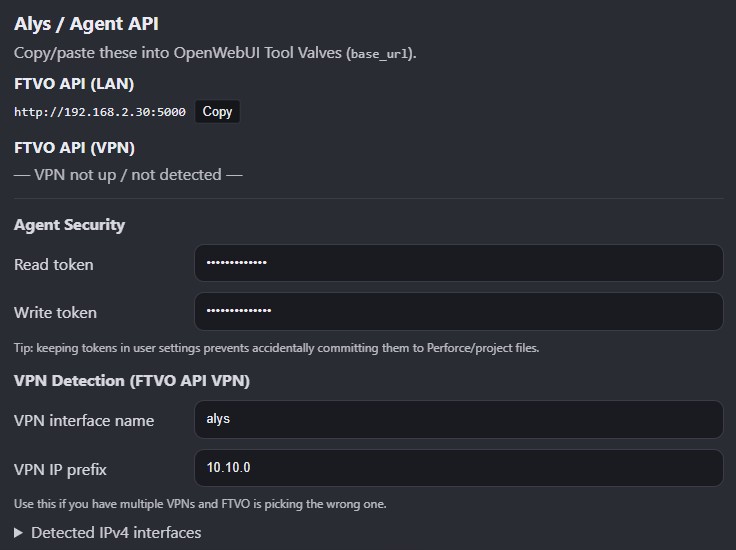
FTVO exposes an Agent API used by Alys and other automation tools.
Two access levels exist.
¶ Reader
Read-only access to project data.
Typical users:
- producers
- QA
- designers
- reviewers
Reader access is useful for project summaries, dialogue search, recording preparation, and QA checks.
¶ Editor
Read + write access to project data.
Capabilities may include:
- creating scenes
- adding lines
- updating dialogue
- updating speaker assignments
- reorganizing project folders
Editor access should only be granted to trusted users.
¶ Custom AI Integration
Although Alys is the primary supported assistant, FTVO’s Agent API can also be used with other local AI tools.
However:
- the API evolves alongside FTVO
- Alys is the reference implementation
- Frostune continuously updates Alys agents to match new FTVO features
- custom integrations may require additional support or project-specific review
For best compatibility, we recommend using Alys and Alys-compatible agents.
¶ Typical Architecture
FTVO Project
      │
      ▼
FTVO Agent API
      │
      ▼
Alys (Private Frostune AI Assistant)
      │
      ├─ Dialogue Project Analysis
      ├─ Recording Workflow Support
      ├─ Document Comparison
      ├─ Jira Integration
      ├─ Perforce Queries
      └─ Unreal / Validation
¶ FTVO Settings – Alys / Agent API Section Example