¶ Alys – Frostune AI Assistant
Alys is Frostune’s AI assistant for Frostune:VO (FTVO).
It runs on a local language model hosted on your infrastructure, augmented with FTVO project data and specialized tools. This allows Alys to understand the structure of your dialogue project, your recording workflow, and your audio pipeline.
Alys can assist designers, producers, QA, and audio teams by analyzing dialogue projects, identifying issues, and performing safe automation tasks.
Alys operates inside a secured environment (VPN + NDA) and never requires sending project data to external AI services.
¶ Core Capabilities
Alys is designed to help teams understand, manage, and validate dialogue projects.
¶ Project Understanding
Alys can analyze the entire FTVO project:
- number of scenes
- dialogue line counts
- speaker distribution
- recording status
- missing voice lines
- WAV coverage
- custom project properties
Example:
“How many lines are still missing recordings?”
¶ Dialogue Search and Analysis
Alys can query dialogue content using multiple filters.
Example questions:
- “Show all lines for the character PRINCE.”
- “Which scenes still contain TEXT_NEEDED placeholders?”
- “List lines that still require recording.”
- “Which scenes have the most dialogue lines?”
¶ Recording Workflow Support
Alys understands the recording pipeline used by FTVO.
It can:
- analyze recording sheets
- detect missing or inconsistent lines
- identify mismatches between documents and the project
- estimate recording session time
Example:
“Estimate how long this recording session will take.”
¶ Dialogue Editing
When authorized with the Editor agent, Alys can modify projects:
- create scenes
- add dialogue lines
- update line text
- update speaker assignments
- organize folders
These operations respect FTVO safeguards such as:
- scene locking
- Perforce integration
- safe project writes
¶ Example Alys Workflows
¶ Dialogue QA
A producer can ask:
“Show lines that still need writing.”
Alys will search the project and list lines containing TEXT_NEEDED.
¶ Recording Preparation
Alys can help prepare recording sessions:
“List all lines for character ALICE that are still to record.”
¶ Document Comparison
Alys can compare external documents with the project.
Supported examples:
- Recording sheets
- Dialogue worksheets
- XLSX spreadsheets
Workflow:
- Drag the document into the Alys chat.
- Ask Alys to compare it with the project.
Example:
“Compare this recording sheet with the project.”
Alys will detect:
- missing lines
- mismatched speakers
- inconsistent status flags
- missing wavs
¶ Available Agents
Alys uses multiple specialized agents.
¶ FTVO Project Agent
Provides direct access to the dialogue project.
Capabilities:
- project statistics
- scene browsing
- dialogue queries
- line editing (Editor mode)
¶ Recording Workflow Knowledge
Alys includes built-in knowledge about:
- voice recording throughput
- recording session estimation
- common VO production workflows
This helps estimate recording time and budget.
¶ Jira Agent
If configured, Alys can interact with Jira:
- query tickets
- summarize issues
- assist with production tracking
Example:
“Show open highest priority VO bugs.”
¶ Perforce (P4) Agent
Allows Alys to read information from Perforce repositories.
Typical uses:
- verify project files
- compare depot vs local data
- assist production teams with data checks
¶ Documentation Agent
Alys can search the project documentation (Wiki).
Example:
“How does the FrostLINK Unreal plugin work?”
¶ Unreal Integration (FrostLINK)
The FrostLINK plugin allows Alys to access Unreal project data.
Possible capabilities include:
- querying dialogue assets
- checking imported voice lines
- validating audio integration
¶ Security Model
Alys is designed for secure studio environments.
Key principles:
- Runs on local infrastructure
- Accessible only through WireGuard VPN
- No external AI APIs required
- Project data never leaves the studio network
Each deployment uses dedicated AI models and agents, ensuring that project data remains isolated and is never shared across clients or projects.
All users accessing Alys operate under NDA agreements and controlled network access.
¶ Using the Agents API
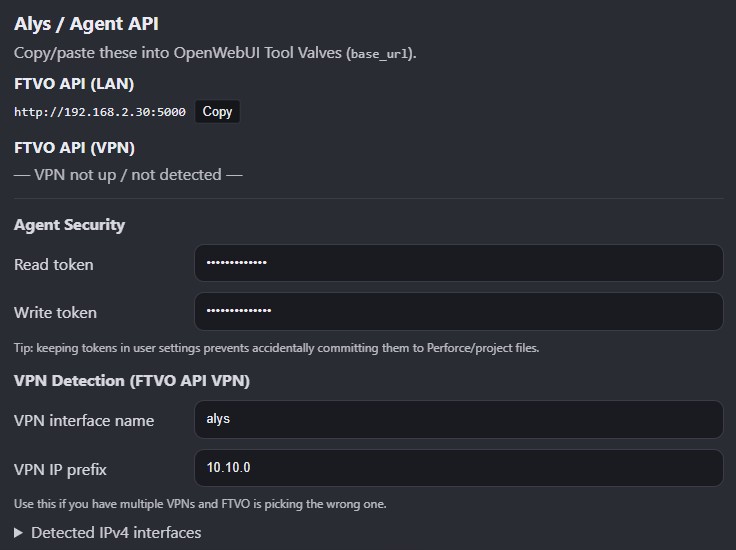
FTVO exposes an Agents API used by Alys and other automation tools.
Two access levels exist:
¶ Reader
Read-only access to project data.
Typical users:
- producers
- QA
- designers
¶ Editor
Read + write access to project data.
Capabilities include:
- creating scenes
- adding lines
- updating dialogue
Editor access should only be granted to trusted users.
¶ Custom AI Integration
Although Alys is the primary supported assistant, FTVO’s agent API can also be used with other local AI tools.
However:
- the API evolves alongside FTVO
- Alys is the reference implementation
- Frostune continuously updates Alys agents to match new FTVO features
For best compatibility, we recommend using Alys and Alys-compatible agents.
¶ Typical Architecture
FTVO Project
      │
      ▼
FTVO Agent API
      │
      ▼
Alys (Local AI Assistant)
      │
      ├─ Dialogue Project Analysis
      ├─ Recording Workflow Support
      ├─ Document Comparison
      ├─ Jira Integration
      ├─ Perforce Queries
      └─ Unreal (FrostLINK)